A Device Enrollment Manager (DEM) in Microsoft Intune is a non-administrator user who can enroll devices in Intune. DEM accounts are useful when IT needs to enroll and prepare many devices (e.g. for distribution or kiosks) without giving full Intune admin rights. A user signed in as a DEM can enroll and manage many more devices than a normal user. Up to 1,000 per DEM account, versus the usual limit of 15 for a standard non-admin. This guide shows how to add a user as a Device Enrollment Manager.
When to Use a DEM
Use a DEM when:
- You need to enroll a large number of devices before handing them to end users.
- Someone (e.g. IT or a depot) will sign into each device with the DEM account, enroll it in Intune, install required apps from the Company Portal, then hand the device to the user.
- You do not want to grant Intune administrator rights to that person.
The DEM account does not need to be an Intune or Microsoft Entra admin; you only add the user to the Device Enrollment Managers list in Intune.
Add a Device Enrollment Manager
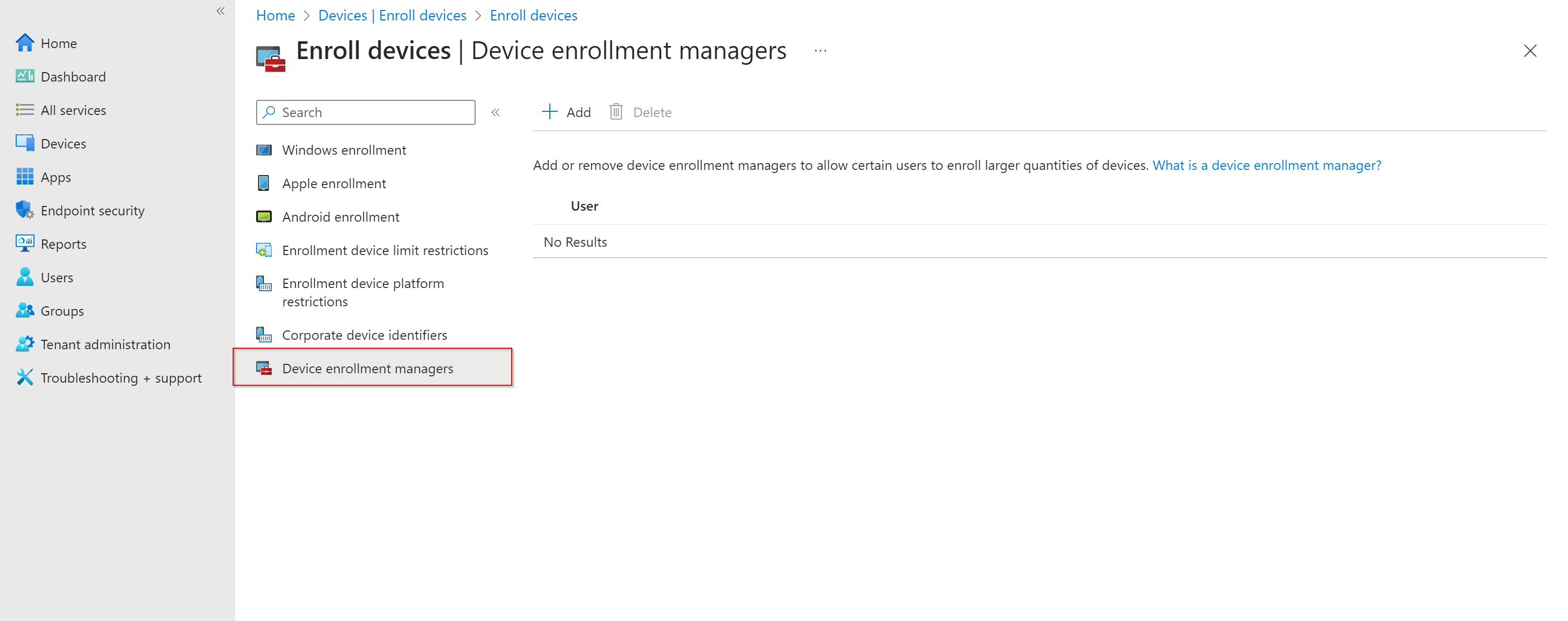
In the Microsoft Intune admin center, go to Devices → Enroll devices. Under Device enrollment managers, click Add.
In the User name field, enter the user principal name (UPN) of the user you want to add as a DEM (e.g. dem.user@contoso.com). Click Add. The user is now a Device Enrollment Manager and can enroll devices in Intune up to the DEM limit (e.g. 1,000 devices). Check current Microsoft documentation for the exact limit in your tenant.
Wrap-up
You can create a Microsoft Intune Device Enrollment Manager by going to Devices → Enroll devices → Device enrollment managers → Add, entering the user’s UPN, and clicking Add. That user can then enroll and manage many devices in Intune without being an Intune administrator. Use DEM accounts when you need to bulk-enroll or stage devices before giving them to end users.